Installation
This chapter is dedicated to the Installation of PatchMon Server and the Agent
- Installing PatchMon Server on Docker
- PatchMon Environment Variables Reference
- Installation of the PatchMon Agent
- First time setup admin page
- Installing PatchMon Server on K8S with Helm
- Nginx example configuration for PatchMon
- Draft: Uninstallation / removal of the Agent
Installing PatchMon Server on Docker
Overview
PatchMon is a containerised application that monitors system patches and updates. The application consists of four main services:
- Database: PostgreSQL 17
- Redis: Redis 7 for BullMQ job queues and caching
- Server: Go API server with embedded frontend (serves both API and static files)
- guacd: Apache Guacamole daemon for in-browser RDP (Windows hosts)
Images
- Server: ghcr.io/patchmon/patchmon-server
Tags
latest: The latest stable release of PatchMonx.y.z: Full version tags (e.g.1.2.3) - Use this for exact version pinning.x.y: Minor version tags (e.g.1.2) - Use this to get the latest patch release in a minor version series.x: Major version tags (e.g.1) - Use this to get the latest minor and patch release in a major version series.edge: The latest development build in main branch. This tag may often be unstable and is intended only for testing and development purposes.
Quick Start
Production Deployment
Automated (recommended)
Run the setup script from an empty directory. It will download docker-compose.yml and env.example, generate all required secrets, and walk you through configuring your URL and timezone interactively:
mkdir patchmon && cd patchmon
curl -fsSL https://raw.githubusercontent.com/PatchMon/PatchMon/refs/heads/main/docker/setup-env.sh | bash
Once the script finishes, start PatchMon:
docker compose up -d
Access the application at the URL you configured (default: http://localhost:3000).
Manual
-
Download the Docker Compose file and environment example:
mkdir patchmon && cd patchmon curl -fsSL -o docker-compose.yml https://raw.githubusercontent.com/PatchMon/PatchMon/refs/heads/main/docker/docker-compose.yml curl -fsSL -o env.example https://raw.githubusercontent.com/PatchMon/PatchMon/refs/heads/main/docker/env.example -
Create your
.envfile from the example:cp env.example .env -
Generate and insert the required secrets:
sed -i "s/^POSTGRES_PASSWORD=.*/POSTGRES_PASSWORD=$(openssl rand -hex 32)/" .env sed -i "s/^REDIS_PASSWORD=.*/REDIS_PASSWORD=$(openssl rand -hex 32)/" .env sed -i "s/^JWT_SECRET=.*/JWT_SECRET=$(openssl rand -hex 64)/" .env sed -i "s/^SESSION_SECRET=.*/SESSION_SECRET=$(openssl rand -hex 64)/" .env sed -i "s/^AI_ENCRYPTION_KEY=.*/AI_ENCRYPTION_KEY=$(openssl rand -hex 64)/" .env -
Edit
.envand configure the required variables. Seeenv.examplefor the full list and docs.patchmon.net for detailed explanations. -
Start the application:
docker compose up -d -
Access the application at
http://localhost:3000
The docker-compose.yml reads all configuration from your .env file. You do not need to edit the compose file itself.
Updating
By default, the compose file uses the latest tag for the server image.
This means you can update PatchMon to the latest version as easily as:
docker compose pull
docker compose up -d
This command will:
- Pull the latest images from the registry
- Recreate containers with updated images
- Maintain your data and configuration
Version-Specific Updates
If you'd like to pin your Docker deployment of PatchMon to a specific version, you can do this in the compose file.
When you do this, updating to a new version requires manually updating the image tags in the compose file yourself:
-
Update the image tag in
docker-compose.yml. For example:services: server: image: ghcr.io/patchmon/patchmon-server:1.2.3 # Update version here ... -
Then run the update command:
docker compose pull
docker compose up -d
[!TIP] Check the releases page for version-specific changes and migration notes.
Configuration
All configuration is managed through the .env file.
For the full list of available variables, see env.example in this directory.
For detailed explanations of each variable (defaults, usage, and examples), see the PatchMon Environment Variables Reference at docs.patchmon.net.
Volumes
The compose file creates two Docker volumes:
postgres_data: PostgreSQL's data directory.redis_data: Redis's data directory.
Agent binaries are included in the server image at /app/agents and served read-only. Deploy or pull a new image to update agents.
Frontend assets (JS, CSS, default logos) are embedded in the server binary. Custom logos are stored in the database and served via the API.
If you wish to bind any of their respective container paths to a host path rather than a Docker volume, you can do so in the Docker Compose file.
Docker Swarm Deployment
[!NOTE] This section covers deploying PatchMon to a Docker Swarm cluster. For standard Docker Compose deployments on a single host, use the production deployment guide above.
Network Configuration
When deploying to Docker Swarm with a reverse proxy (e.g., Traefik), proper network configuration is critical. The default docker-compose.yml uses an internal bridge network that enables service-to-service communication:
networks:
  patchmon-internal:
    driver: bridge
All services (database, redis, and server) connect to this internal network, allowing them to discover each other by service name.
Important: If you're using an external reverse proxy network (like traefik-net), ensure that:
- All PatchMon services remain on the
patchmon-internalnetwork for internal communication - The server service can be configured to also bind to the reverse proxy network if needed
- Service names resolve correctly within the same network
Service Discovery in Swarm
In Docker Swarm, service discovery works through:
- Service Name Resolution: Service names resolve to virtual IPs within the same network
- Load Balancing: Requests to a service name are automatically load-balanced across all replicas
- Network Isolation: Services on different networks cannot communicate directly
Configuration for Swarm with Traefik
If you're using Traefik as a reverse proxy:
- Keep the default
patchmon-internalnetwork for server services - Configure Traefik in your Swarm deployment with its own network
- Ensure the server service is reachable through the internal network
Example modification for Swarm:
services:
  server:
    image: ghcr.io/patchmon/patchmon-server:latest
    networks:
      - patchmon-internal
    deploy:
      replicas: 1
      labels:
        - "traefik.enable=true"
        - "traefik.http.routers.patchmon.rule=Host(`patchmon.my.domain`)"
        # ... other Traefik labels
Traefik routes external traffic to the server service, which serves both the API and frontend.
Troubleshooting Network Issues
Error: host not found in upstream "server"
This typically occurs when:
- Services are on different networks
- Services haven't fully started (check health checks)
- Service names haven't propagated through DNS
Solution:
- Verify all services are on the same internal network
- Check service health status:
docker ps(production) ordocker service ps(Swarm) - Wait for health checks to pass before accessing the application
- Confirm network connectivity:
docker exec <container> ping server
Development
This section is for developers who want to contribute to PatchMon or run it in development mode.
Development Setup
For development with live reload and source code mounting:
-
Clone the repository:
git clone https://github.com/PatchMon/PatchMon.git cd PatchMon -
Start development environment:
docker compose -f docker/docker-compose.dev.yml upSee Development Commands for more options.
-
Access the application:
- Application (API + frontend):
http://localhost:3000 - Database:
localhost:5432 - Redis:
localhost:6379
- Application (API + frontend):
Development Docker Compose
The development compose file (docker/docker-compose.dev.yml):
- Builds images locally from source using development targets
- Enables hot reload with Docker Compose watch functionality
- Exposes database and backend ports for testing and development
- Mounts source code directly into containers for live development
- Supports debugging with enhanced logging
Building Images Locally
Both Dockerfiles use multi-stage builds with separate development and production targets.
Note: When using locally-built images (e.g. patchmon-server:dev), do not run docker compose pull for the full stack—Compose will try to pull that name from Docker Hub and fail (it exists only on your machine). Use docker compose up -d so Compose uses your local image, or run docker compose pull database redis if you only want to refresh Postgres/Redis.
Server agent binaries: The server image includes agent scripts and prebuilt binaries. To build locally, run make build-all-for-docker in agent-source-code/ first so agents-prebuilt/ is populated.
# Build development image
docker build -f docker/server.Dockerfile --target development --provenance=false --sbom=false -t patchmon-server:dev .

# Build production image (default target)
docker build -f docker/server.Dockerfile --provenance=false --sbom=false -t patchmon-server:latest .
Development Commands
Hot Reload Development
# Attached, live log output, services stopped on Ctrl+C
docker compose -f docker/docker-compose.dev.yml up

# Attached with Docker Compose watch for hot reload
docker compose -f docker/docker-compose.dev.yml up --watch

# Detached
docker compose -f docker/docker-compose.dev.yml up -d

# Quiet, no log output, with Docker Compose watch for hot reload
docker compose -f docker/docker-compose.dev.yml watch
Rebuild Services
# Rebuild specific service
docker compose -f docker/docker-compose.dev.yml up -d --build server

# Rebuild all services
docker compose -f docker/docker-compose.dev.yml up -d --build
Development Ports
The development setup exposes additional ports for debugging:
- Database:
5432- Direct PostgreSQL access - Redis:
6379- Direct Redis access - Backend:
3001- API server with development features - Frontend:
3000- React development server with hot reload
Development Workflow
-
Initial Setup: Clone repository and start development environment
git clone https://github.com/PatchMon/PatchMon.git cd PatchMon docker compose -f docker/docker-compose.dev.yml up -d --build -
Hot Reload Development: Use Docker Compose watch for automatic reload
docker compose -f docker/docker-compose.dev.yml up --watch --build -
Code Changes:
- Frontend/Backend Source: Files are synced automatically with watch mode
- Package.json Changes: Triggers automatic service rebuild
- Prisma Schema Changes: Backend service restarts automatically
-
Database Access: Connect database client directly to
localhost:5432 -
Redis Access: Connect Redis client directly to
localhost:6379 -
Debug: If started with
docker compose [...] up -dordocker compose [...] watch, check logs manually:docker compose -f docker/docker-compose.dev.yml logs -fOtherwise logs are shown automatically in attached modes (
up,up --watch).
Features in Development Mode
- Hot Reload: Automatic code synchronization and service restarts
- Enhanced Logging: Detailed logs for debugging
- Direct Access: Exposed ports for database, Redis, and API debugging
- Health Checks: Built-in health monitoring for services
- Volume Persistence: Development data persists between restarts
PatchMon Environment Variables Reference
This document provides a comprehensive reference for all environment variables available in PatchMon. These variables can be configured in your backend/.env file (bare metal installations) or in the .env file alongside docker-compose.yml (Docker deployments using env_file).
Database Configuration
PostgreSQL database connection settings.
| Variable | Description | Default | Required | Example |
|---|---|---|---|---|
DATABASE_URL |
PostgreSQL connection string | - | Yes | postgresql://user:pass@localhost:5432/patchmon_db |
PM_DB_CONN_MAX_ATTEMPTS |
Maximum database connection attempts during startup | 30 |
No | 30 |
PM_DB_CONN_WAIT_INTERVAL |
Wait interval between connection attempts (seconds) | 2 |
No | 2 |
Usage Notes
- The
DATABASE_URLmust be a valid PostgreSQL connection string - Connection retry logic helps handle database startup delays in containerized environments
- Format:
postgresql://[user]:[password]@[host]:[port]/[database] - In Docker deployments,
DATABASE_URLis constructed automatically in the compose file - you do not set it in.env
Database Connection Pool (Prisma)
Connection pooling configuration for optimal database performance and resource management.
| Variable | Description | Default | Required | Example |
|---|---|---|---|---|
DB_CONNECTION_LIMIT |
Maximum number of database connections per instance | 30 |
No | 30 |
DB_POOL_TIMEOUT |
Seconds to wait for an available connection before timeout | 20 |
No | 20 |
DB_CONNECT_TIMEOUT |
Seconds to wait for initial database connection | 10 |
No | 10 |
DB_IDLE_TIMEOUT |
Seconds before closing idle connections | 300 |
No | 300 |
DB_MAX_LIFETIME |
Maximum lifetime of a connection in seconds | 1800 |
No | 1800 |
Sizing Guidelines
Small Deployment (1-10 hosts):
DB_CONNECTION_LIMIT=15
DB_POOL_TIMEOUT=20
Medium Deployment (10-50 hosts):
DB_CONNECTION_LIMIT=30  # Default
DB_POOL_TIMEOUT=20
Large Deployment (50+ hosts):
DB_CONNECTION_LIMIT=50
DB_POOL_TIMEOUT=30
Connection Pool Calculation
Use this formula to estimate your needs:
DB_CONNECTION_LIMIT = (expected_hosts * 2) + (concurrent_users * 2) + 5
Example: 20 hosts + 3 concurrent users:
(20 * 2) + (3 * 2) + 5 = 51 connections
Important Notes
- Each backend instance maintains its own connection pool
- Running multiple backend instances requires considering total connections to PostgreSQL
- PostgreSQL default
max_connectionsis 100 (ensure your pool size doesn't exceed this) - Connections are reused efficiently - you don't need one connection per host
- Increase pool size if experiencing timeout errors during high load
Detecting Connection Pool Issues
When connection pool limits are hit, you'll see clear error messages in your backend console:
Typical Pool Timeout Error:
Host creation error: Error: Timed out fetching a new connection from the connection pool.
DATABASE CONNECTION POOL EXHAUSTED!
Current limit: DB_CONNECTION_LIMIT=30
Pool timeout: DB_POOL_TIMEOUT=20s
Suggestion: Increase DB_CONNECTION_LIMIT in your .env file
If you see these errors frequently, increase DB_CONNECTION_LIMIT by 10-20 and monitor your system.
Monitoring Connection Pool Usage
You can monitor your PostgreSQL connections to determine optimal pool size:
Check Current Connections:
# Connect to PostgreSQL
psql -U patchmon_user -d patchmon_db

# Run this query
SELECT count(*) as current_connections,
       (SELECT setting::int FROM pg_settings WHERE name='max_connections') as max_connections
FROM pg_stat_activity
WHERE datname = 'patchmon_db';
Recommended Actions:
- If
current_connectionsfrequently approachesDB_CONNECTION_LIMIT, increase the pool size - Monitor during peak usage (when multiple users are active, agents checking in)
- Leave 20-30% headroom for burst traffic
Database Transaction Timeouts
Control how long database transactions can run before being terminated.
| Variable | Description | Default | Required | Example |
|---|---|---|---|---|
DB_TRANSACTION_MAX_WAIT |
Maximum time (ms) to wait for a transaction to start | 10000 |
No | 10000 |
DB_TRANSACTION_TIMEOUT |
Maximum time (ms) for a standard transaction to complete | 30000 |
No | 30000 |
DB_TRANSACTION_LONG_TIMEOUT |
Maximum time (ms) for long-running transactions (e.g. bulk operations) | 60000 |
No | 60000 |
Usage Notes
- These prevent runaway queries from holding database locks indefinitely
- Increase
DB_TRANSACTION_LONG_TIMEOUTif bulk import or migration operations are timing out - All values are in milliseconds
Authentication & Security
JWT token configuration and security settings.
| Variable | Description | Default | Required | Example |
|---|---|---|---|---|
JWT_SECRET |
Secret key for signing JWT tokens | - | Yes | your-secure-random-secret-key |
JWT_EXPIRES_IN |
Access token expiration time | 1h |
No | 1h, 30m, 2h |
JWT_REFRESH_EXPIRES_IN |
Refresh token expiration time | 7d |
No | 7d, 3d, 14d |
Generating Secure Secrets
# Linux/macOS
openssl rand -hex 64
Time Format
Supports the following formats:
s: secondsm: minutesh: hoursd: days
Examples: 30s, 15m, 2h, 7d
Recommended Settings
Development:
JWT_EXPIRES_IN=1h
JWT_REFRESH_EXPIRES_IN=7d
Production:
JWT_EXPIRES_IN=30m
JWT_REFRESH_EXPIRES_IN=3d
High Security:
JWT_EXPIRES_IN=15m
JWT_REFRESH_EXPIRES_IN=1d
Password Policy
Enforce password complexity requirements for local user accounts.
| Variable | Description | Default | Required | Example |
|---|---|---|---|---|
PASSWORD_MIN_LENGTH |
Minimum password length | 8 |
No | 8, 12, 16 |
PASSWORD_REQUIRE_UPPERCASE |
Require at least one uppercase letter | true |
No | true, false |
PASSWORD_REQUIRE_LOWERCASE |
Require at least one lowercase letter | true |
No | true, false |
PASSWORD_REQUIRE_NUMBER |
Require at least one number | true |
No | true, false |
PASSWORD_REQUIRE_SPECIAL |
Require at least one special character | true |
No | true, false |
PASSWORD_RATE_LIMIT_WINDOW_MS |
Rate limit window for password changes (ms) | 900000 |
No | 900000 (15 min) |
PASSWORD_RATE_LIMIT_MAX |
Maximum password change attempts per window | 5 |
No | 5 |
Recommended Settings
Standard (default):
PASSWORD_MIN_LENGTH=8
PASSWORD_REQUIRE_UPPERCASE=true
PASSWORD_REQUIRE_LOWERCASE=true
PASSWORD_REQUIRE_NUMBER=true
PASSWORD_REQUIRE_SPECIAL=true
High Security:
PASSWORD_MIN_LENGTH=12
PASSWORD_REQUIRE_UPPERCASE=true
PASSWORD_REQUIRE_LOWERCASE=true
PASSWORD_REQUIRE_NUMBER=true
PASSWORD_REQUIRE_SPECIAL=true
PASSWORD_RATE_LIMIT_MAX=3
Usage Notes
- These rules apply to local accounts only - OIDC users authenticate against their identity provider
- Password changes and new account creation both enforce these rules
PASSWORD_RATE_LIMIT_*prevents brute-force password change attempts
Account Lockout
Protect against brute-force login attacks by temporarily locking accounts after repeated failures.
| Variable | Description | Default | Required | Example |
|---|---|---|---|---|
MAX_LOGIN_ATTEMPTS |
Failed login attempts before account lockout | 5 |
No | 5, 3, 10 |
LOCKOUT_DURATION_MINUTES |
Minutes the account stays locked after exceeding attempts | 15 |
No | 15, 30, 60 |
Usage Notes
- Lockout is per-account, not per-IP
- The failed attempts counter has a 15-minute rolling window - if no further failed attempts occur within that window, the counter resets on its own
- A successful login clears the failed attempts counter (before lockout is triggered)
- Once locked out, the account stays locked for the full
LOCKOUT_DURATION_MINUTES- there is no way to bypass this except waiting - Setting
MAX_LOGIN_ATTEMPTStoo low may lock out legitimate users who mistype passwords
Recommended Settings
Standard:
MAX_LOGIN_ATTEMPTS=5
LOCKOUT_DURATION_MINUTES=15
High Security:
MAX_LOGIN_ATTEMPTS=3
LOCKOUT_DURATION_MINUTES=30
Session Management
Control user session behavior and security.
| Variable | Description | Default | Required | Example |
|---|---|---|---|---|
SESSION_INACTIVITY_TIMEOUT_MINUTES |
Minutes of inactivity before automatic logout | 30 |
No | 30 |
Usage Notes
- Sessions are tracked in the database with activity timestamps
- Each authenticated request updates the session activity
- Expired sessions are automatically invalidated
- Users must log in again after timeout period
- Lower values provide better security but may impact user experience
Recommended Settings
- High Security Environment:
15minutes - Standard Security:
30minutes (default) - User-Friendly:
60minutes
Two-Factor Authentication (TFA)
Settings for two-factor authentication when users have it enabled.
| Variable | Description | Default | Required | Example |
|---|---|---|---|---|
MAX_TFA_ATTEMPTS |
Failed TFA code attempts before lockout | 5 |
No | 5, 3 |
TFA_LOCKOUT_DURATION_MINUTES |
Minutes locked out after exceeding TFA attempts | 30 |
No | 30, 60 |
TFA_REMEMBER_ME_EXPIRES_IN |
"Remember this device" token expiration | 30d |
No | 30d, 7d, 90d |
TFA_MAX_REMEMBER_SESSIONS |
Maximum remembered devices per user | 5 |
No | 5 |
TFA_SUSPICIOUS_ACTIVITY_THRESHOLD |
Failed attempts before flagging suspicious activity | 3 |
No | 3 |
Usage Notes
- These variables only apply when users have TFA enabled on their account
- "Remember this device" allows users to skip TFA on trusted devices
MAX_TFA_ATTEMPTSandTFA_LOCKOUT_DURATION_MINUTESprevent brute-force attacks on TOTP codes- Suspicious activity detection can trigger additional security measures
- Remembered sessions can be revoked by users or admins
Recommended Settings
Standard:
MAX_TFA_ATTEMPTS=5
TFA_LOCKOUT_DURATION_MINUTES=30
TFA_REMEMBER_ME_EXPIRES_IN=30d
TFA_MAX_REMEMBER_SESSIONS=5
TFA_SUSPICIOUS_ACTIVITY_THRESHOLD=3
High Security:
MAX_TFA_ATTEMPTS=3
TFA_LOCKOUT_DURATION_MINUTES=60
TFA_REMEMBER_ME_EXPIRES_IN=7d
TFA_MAX_REMEMBER_SESSIONS=3
TFA_SUSPICIOUS_ACTIVITY_THRESHOLD=2
OIDC / SSO
OpenID Connect configuration for Single Sign-On. Set OIDC_ENABLED=true and fill in your identity provider details to enable SSO.
| Variable | Description | Default | Required | Example |
|---|---|---|---|---|
OIDC_ENABLED |
Enable OIDC authentication | false |
No | true, false |
OIDC_ISSUER_URL |
Identity provider issuer URL | - | If OIDC enabled | https://auth.example.com |
OIDC_CLIENT_ID |
OAuth client ID | - | If OIDC enabled | patchmon |
OIDC_CLIENT_SECRET |
OAuth client secret | - | If OIDC enabled | your-client-secret |
OIDC_REDIRECT_URI |
Callback URL after authentication | - | If OIDC enabled | https://patchmon.example.com/api/v1/auth/oidc/callback |
OIDC_SCOPES |
OAuth scopes to request | openid email profile groups |
No | openid email profile groups |
OIDC_AUTO_CREATE_USERS |
Automatically create PatchMon accounts for new OIDC users | true |
No | true, false |
OIDC_DEFAULT_ROLE |
Default role for auto-created OIDC users | user |
No | user, admin, viewer |
OIDC_DISABLE_LOCAL_AUTH |
Disable local username/password login when OIDC is enabled | false |
No | true, false |
OIDC_BUTTON_TEXT |
Login button text shown on the login page | Login with SSO |
No | Login with SSO, Sign in with Authentik |
Group-to-Role Mapping
Map OIDC groups from your identity provider to PatchMon roles. This keeps role assignments in sync with your IdP.
| Variable | Description | Default | Required | Example |
|---|---|---|---|---|
OIDC_ADMIN_GROUP |
OIDC group name that maps to admin role | - | No | PatchMon Admins |
OIDC_USER_GROUP |
OIDC group name that maps to user role | - | No | PatchMon Users |
OIDC_SYNC_ROLES |
Sync roles from OIDC groups on each login | true |
No | true, false |
Example: Authentik
OIDC_ENABLED=true
OIDC_ISSUER_URL=https://authentik.example.com/application/o/patchmon/
OIDC_CLIENT_ID=patchmon
OIDC_CLIENT_SECRET=your-client-secret-here
OIDC_REDIRECT_URI=https://patchmon.example.com/api/v1/auth/oidc/callback
OIDC_SCOPES=openid email profile groups
OIDC_AUTO_CREATE_USERS=true
OIDC_DEFAULT_ROLE=user
OIDC_BUTTON_TEXT=Login with Authentik
OIDC_ADMIN_GROUP=PatchMon Admins
OIDC_USER_GROUP=PatchMon Users
OIDC_SYNC_ROLES=true
Example: Keycloak
OIDC_ENABLED=true
OIDC_ISSUER_URL=https://keycloak.example.com/realms/your-realm
OIDC_CLIENT_ID=patchmon
OIDC_CLIENT_SECRET=your-client-secret-here
OIDC_REDIRECT_URI=https://patchmon.example.com/api/v1/auth/oidc/callback
OIDC_SCOPES=openid email profile groups
OIDC_AUTO_CREATE_USERS=true
OIDC_DEFAULT_ROLE=user
OIDC_BUTTON_TEXT=Login with Keycloak
Usage Notes
OIDC_REDIRECT_URImust be registered as an allowed redirect URI in your identity provider- When
OIDC_DISABLE_LOCAL_AUTH=true, users can only log in via OIDC - useful for enforcing SSO across the organisation - When
OIDC_SYNC_ROLES=true, the user's role is updated on every login based on their OIDC group membership - If a user is in both
OIDC_ADMIN_GROUPandOIDC_USER_GROUP, the admin role takes precedence - The
groupsscope must be supported by your identity provider and included inOIDC_SCOPESfor group mapping to work
Server & Network Configuration
Server protocol, host, and CORS settings.
| Variable | Description | Default | Required | Example |
|---|---|---|---|---|
PORT |
Backend API server port | 3001 |
No | 3001 |
NODE_ENV |
Node.js environment mode | production |
No | production, development |
SERVER_PROTOCOL |
Server protocol | http |
No | http, https |
SERVER_HOST |
Server hostname/domain | localhost |
No | patchmon.example.com |
SERVER_PORT |
Server port | 3000 |
No | 3000, 443 |
CORS_ORIGIN |
Allowed CORS origin URL | http://localhost:3000 |
No | https://patchmon.example.com |
CORS_ORIGINS |
Multiple allowed CORS origins (comma-separated) | - | No | https://a.example.com,https://b.example.com |
ENABLE_HSTS |
Enable HTTP Strict Transport Security | true |
No | true, false |
TRUST_PROXY |
Trust proxy headers (when behind reverse proxy) | true |
No | true, false |
Usage Notes
SERVER_PROTOCOL,SERVER_HOST, andSERVER_PORTare used to generate agent installation scriptsCORS_ORIGINmust match the URL you use to access PatchMon in your browserCORS_ORIGINS(plural, comma-separated) overridesCORS_ORIGINwhen set - only needed if PatchMon is accessed from multiple domains- Set
TRUST_PROXYtotruewhen behind nginx, Apache, or other reverse proxies ENABLE_HSTSshould betruein production with HTTPS
Example Configurations
Local Development:
SERVER_PROTOCOL=http
SERVER_HOST=localhost
SERVER_PORT=3000
CORS_ORIGIN=http://localhost:3000
ENABLE_HSTS=false
TRUST_PROXY=false
Production with HTTPS:
SERVER_PROTOCOL=https
SERVER_HOST=patchmon.example.com
SERVER_PORT=443
CORS_ORIGIN=https://patchmon.example.com
ENABLE_HSTS=true
TRUST_PROXY=true
Multiple Domains:
SERVER_PROTOCOL=https
SERVER_HOST=patchmon.example.com
SERVER_PORT=443
CORS_ORIGINS=https://patchmon.example.com,https://patchmon-alt.example.com
ENABLE_HSTS=true
TRUST_PROXY=true
Rate Limiting
Protect your API from abuse with configurable rate limits.
| Variable | Description | Default | Required | Example |
|---|---|---|---|---|
RATE_LIMIT_WINDOW_MS |
General rate limit window (milliseconds) | 900000 |
No | 900000 (15 min) |
RATE_LIMIT_MAX |
Maximum requests per window (general) | 5000 |
No | 5000 |
AUTH_RATE_LIMIT_WINDOW_MS |
Authentication endpoints rate limit window (ms) | 600000 |
No | 600000 (10 min) |
AUTH_RATE_LIMIT_MAX |
Maximum auth requests per window | 500 |
No | 500 |
AGENT_RATE_LIMIT_WINDOW_MS |
Agent API rate limit window (ms) | 60000 |
No | 60000 (1 min) |
AGENT_RATE_LIMIT_MAX |
Maximum agent requests per window | 1000 |
No | 1000 |
Understanding Rate Limits
Rate limits are applied per IP address and endpoint category:
- General API: Dashboard, hosts, packages, user management
- Authentication: Login, logout, token refresh
- Agent API: Agent check-ins, updates, package reports
Calculating Windows
The window is a sliding time frame. Examples:
900000ms = 15 minutes600000ms = 10 minutes60000ms = 1 minute
Recommended Settings
Default (Balanced):
RATE_LIMIT_WINDOW_MS=900000      # 15 minutes
RATE_LIMIT_MAX=5000              # ~5.5 requests/second
AUTH_RATE_LIMIT_WINDOW_MS=600000 # 10 minutes
AUTH_RATE_LIMIT_MAX=500          # ~0.8 requests/second
AGENT_RATE_LIMIT_WINDOW_MS=60000 # 1 minute
AGENT_RATE_LIMIT_MAX=1000        # ~16 requests/second
Strict (High Security):
RATE_LIMIT_WINDOW_MS=900000      # 15 minutes
RATE_LIMIT_MAX=2000              # ~2.2 requests/second
AUTH_RATE_LIMIT_WINDOW_MS=600000 # 10 minutes
AUTH_RATE_LIMIT_MAX=100          # ~0.16 requests/second
AGENT_RATE_LIMIT_WINDOW_MS=60000 # 1 minute
AGENT_RATE_LIMIT_MAX=500         # ~8 requests/second
Relaxed (Development/Testing):
RATE_LIMIT_WINDOW_MS=900000      # 15 minutes
RATE_LIMIT_MAX=10000             # ~11 requests/second
AUTH_RATE_LIMIT_WINDOW_MS=600000 # 10 minutes
AUTH_RATE_LIMIT_MAX=1000         # ~1.6 requests/second
AGENT_RATE_LIMIT_WINDOW_MS=60000 # 1 minute
AGENT_RATE_LIMIT_MAX=2000        # ~33 requests/second
Redis Configuration
Redis is used for BullMQ job queues and caching.
| Variable | Description | Default | Required | Example |
|---|---|---|---|---|
REDIS_HOST |
Redis server hostname | localhost |
No | localhost, redis, 10.0.0.5 |
REDIS_PORT |
Redis server port | 6379 |
No | 6379 |
REDIS_USER |
Redis username (Redis 6+) | - | No | default |
REDIS_PASSWORD |
Redis authentication password | - | Recommended | your-redis-password |
REDIS_DB |
Redis database number | 0 |
No | 0, 1, 2 |
Usage Notes
- Redis authentication is highly recommended for security
- Redis 6.0+ supports ACL with usernames; earlier versions use password-only auth
- If no password is set, Redis will be accessible without authentication (not recommended)
- Database number allows multiple applications to use the same Redis instance
Docker Deployment
In Docker, set REDIS_PASSWORD in your .env file. The compose file automatically passes it to both the Redis container (via its startup command) and the backend service (via env_file).
Bare Metal Deployment
The setup script configures Redis ACL with a dedicated user and password per instance. The credentials are written to backend/.env automatically.
Generating Secure Passwords
openssl rand -hex 32
Logging
Control application logging behavior and verbosity.
| Variable | Description | Default | Required | Example |
|---|---|---|---|---|
LOG_LEVEL |
Logging level | info |
No | debug, info, warn, error |
ENABLE_LOGGING |
Enable/disable application logging | true |
No | true, false |
PM_LOG_TO_CONSOLE |
Output logs to the console | false |
No | true, false |
PM_LOG_REQUESTS_IN_DEV |
Log HTTP requests in development mode | false |
No | true, false |
PRISMA_LOG_QUERIES |
Log all Prisma database queries | false |
No | true, false |
Log Levels
Ordered from most to least verbose:
debug: All logs including database queries, internal operationsinfo: General information, startup messages, normal operationswarn: Warning messages, deprecated features, non-critical issueserror: Error messages only, critical issues
Recommended Settings
Development:
LOG_LEVEL=debug
ENABLE_LOGGING=true
PM_LOG_TO_CONSOLE=true
PM_LOG_REQUESTS_IN_DEV=true
PRISMA_LOG_QUERIES=true
Production:
LOG_LEVEL=info
ENABLE_LOGGING=true
PM_LOG_TO_CONSOLE=false
PRISMA_LOG_QUERIES=false
Production (Quiet):
LOG_LEVEL=warn
ENABLE_LOGGING=true
PRISMA_LOG_QUERIES=false
Timezone Configuration
Control timezone handling for timestamps and logs across the application.
| Variable | Description | Default | Required | Example |
|---|---|---|---|---|
TZ |
Timezone for timestamps and logs | UTC |
No | UTC, America/New_York, Europe/London |
Usage Notes
- The
TZenvironment variable controls timezone handling across all components:- Backend (Node.js): Timestamps in API responses, database records, logs
- Agent (Go): Agent logs, integration data timestamps
- If
TZis not set, the application defaults to UTC - Database timestamps are always stored in UTC for consistency
- Display timestamps can be converted to the configured timezone
Common Timezone Values
# UTC (recommended for servers)
TZ=UTC

# UK
TZ=Europe/London

# US
TZ=America/New_York       # Eastern
TZ=America/Chicago         # Central
TZ=America/Los_Angeles    # Pacific

# Europe
TZ=Europe/Paris
TZ=Europe/Berlin

# Asia
TZ=Asia/Tokyo
TZ=Asia/Shanghai
Body Size Limits
Control the maximum size of request bodies accepted by the API.
| Variable | Description | Default | Required | Example |
|---|---|---|---|---|
JSON_BODY_LIMIT |
Maximum JSON request body size | 5mb |
No | 5mb, 10mb, 1mb |
AGENT_UPDATE_BODY_LIMIT |
Maximum body size for agent update payloads | 2mb |
No | 2mb, 5mb |
Usage Notes
JSON_BODY_LIMITapplies to all standard API endpoints (dashboard actions, user management, etc.)AGENT_UPDATE_BODY_LIMITapplies specifically to agent check-in and package report payloads- Increase these if agents are managing a very large number of packages and the payload exceeds the limit
- Keep these as low as practical to limit memory usage and reduce the impact of oversized requests
Encryption
Controls encryption of sensitive data stored in the database (e.g. AI provider API keys, bootstrap tokens).
| Variable | Description | Default | Required | Example |
|---|---|---|---|---|
AI_ENCRYPTION_KEY |
Encryption key for sensitive data at rest (64 hex characters) | - | No | Output of openssl rand -hex 32 |
SESSION_SECRET |
Fallback key used if AI_ENCRYPTION_KEY is not set |
- | No | Output of openssl rand -hex 32 |
How It Works
The backend uses this priority chain to determine the encryption key:
AI_ENCRYPTION_KEY- used directly if set (64 hex chars = 32 bytes, or any string which gets SHA-256 hashed)SESSION_SECRET- ifAI_ENCRYPTION_KEYis not set, SHA-256 hashed to derive the keyDATABASE_URL- if neither above is set, derives a key from the database URL (logs a security warning)- Ephemeral - last resort, generates a random key (data encrypted with this key will be unreadable after a restart)
What Gets Encrypted
- AI API keys - API keys for AI providers (e.g. OpenAI) are AES-256-GCM encrypted before being stored in the database
- Bootstrap tokens - Agent auto-enrollment API keys are encrypted before temporary storage in Redis
Usage Notes
- For most deployments, you do not need to set either variable - the key is derived from
DATABASE_URLwhich is stable - Set
AI_ENCRYPTION_KEYif you need encryption stability across database URL changes or multi-replica deployments - These do not affect user password storage (passwords are bcrypt hashed, not encrypted)
User Management
Default settings for new users.
| Variable | Description | Default | Required | Example |
|---|---|---|---|---|
DEFAULT_USER_ROLE |
Default role assigned to new users | user |
No | user, admin, viewer |
Available Roles
admin: Full system access, can manage users and settingsuser: Standard access, can manage hosts and packagesviewer: Read-only access, cannot make changes
Usage Notes
- Only applies to newly created users
- Existing users are not affected by changes to this variable
- First user created through setup is always an admin
- Can be changed per-user through the user management interface
Frontend Configuration
Frontend-specific environment variables (used during build and runtime).
| Variable | Description | Default | Required | Example |
|---|---|---|---|---|
VITE_API_URL |
Backend API base URL | /api/v1 |
No | http://localhost:3001/api/v1 |
VITE_APP_NAME |
Application name displayed in UI | PatchMon |
No | PatchMon |
VITE_APP_VERSION |
Application version displayed in UI | (from package.json) | No | 1.4.0 |
BACKEND_HOST |
Backend hostname (Docker only) | backend |
No | backend, localhost |
BACKEND_PORT |
Backend port (Docker only) | 3001 |
No | 3001 |
VITE_ENABLE_LOGGING |
Enable frontend debug logging | false |
No | true, false |
Usage Notes
- Frontend variables are prefixed with
VITE_for the Vite build system VITE_*variables are embedded at build time - they cannot be changed at runtimeVITE_API_URLcan be relative (/api/v1) or absoluteBACKEND_HOSTandBACKEND_PORTare used by the Docker frontend container's Nginx proxy config
Complete Example Configuration
Bare Metal (Production)
# Database
DATABASE_URL="postgresql://patchmon_user:secure_db_password@localhost:5432/patchmon_db"
PM_DB_CONN_MAX_ATTEMPTS=30
PM_DB_CONN_WAIT_INTERVAL=2

# Database Connection Pool
DB_CONNECTION_LIMIT=30
DB_POOL_TIMEOUT=20
DB_CONNECT_TIMEOUT=10
DB_IDLE_TIMEOUT=300
DB_MAX_LIFETIME=1800

# JWT
JWT_SECRET="generated-secure-secret-from-openssl"
JWT_EXPIRES_IN=30m
JWT_REFRESH_EXPIRES_IN=3d

# Server
PORT=3001
NODE_ENV=production
SERVER_PROTOCOL=https
SERVER_HOST=patchmon.example.com
SERVER_PORT=443
CORS_ORIGIN=https://patchmon.example.com
ENABLE_HSTS=true
TRUST_PROXY=true

# Session
SESSION_INACTIVITY_TIMEOUT_MINUTES=30

# User
DEFAULT_USER_ROLE=user

# Rate Limiting
RATE_LIMIT_WINDOW_MS=900000
RATE_LIMIT_MAX=5000
AUTH_RATE_LIMIT_WINDOW_MS=600000
AUTH_RATE_LIMIT_MAX=500
AGENT_RATE_LIMIT_WINDOW_MS=60000
AGENT_RATE_LIMIT_MAX=1000

# Redis
REDIS_HOST=localhost
REDIS_PORT=6379
REDIS_PASSWORD=secure_redis_password
REDIS_DB=0

# Logging
LOG_LEVEL=info
ENABLE_LOGGING=true

# Timezone
TZ=UTC

# TFA
TFA_REMEMBER_ME_EXPIRES_IN=30d
TFA_MAX_REMEMBER_SESSIONS=5
TFA_SUSPICIOUS_ACTIVITY_THRESHOLD=3
Docker (Production)
For Docker deployments, see docker/env.example for a complete template. Copy it to .env, fill in the required values, and run docker compose up -d. The compose file reads all variables via env_file: .env.
Troubleshooting
Common Issues
"timeout of 10000ms exceeded" when adding hosts:
- Increase
DB_CONNECTION_LIMIT(try 30 or higher) - Increase
DB_POOL_TIMEOUT(try 20 or 30) - Check backend logs for "DATABASE CONNECTION POOL EXHAUSTED" messages
Database connection failures on startup:
- Increase
PM_DB_CONN_MAX_ATTEMPTS - Increase
PM_DB_CONN_WAIT_INTERVAL - Verify
DATABASE_URLis correct
"Invalid or expired session" errors:
- Check
JWT_SECREThasn't changed between restarts - Verify
SESSION_INACTIVITY_TIMEOUT_MINUTESisn't too low - Ensure
JWT_EXPIRES_INis reasonable
Rate limit errors (429 Too Many Requests):
- Increase
RATE_LIMIT_MAXvalues - Increase window duration (
*_WINDOW_MSvariables)
CORS errors:
- Verify
CORS_ORIGINmatches your frontend URL exactly (protocol + domain + port) - For multiple domains, use
CORS_ORIGINS(plural, comma-separated)
OIDC login fails:
- Verify
OIDC_REDIRECT_URIis registered in your identity provider - Check
OIDC_ISSUER_URLis reachable from the PatchMon server - Ensure
OIDC_CLIENT_SECRETmatches the value in your IdP
Encrypted data unreadable after restart:
- Set
AI_ENCRYPTION_KEYto a stable value so the key persists across restarts - Re-enter AI provider API keys if the encryption key has changed
Security Best Practices
-
Always set strong secrets:
- Use
openssl rand -hex 64forJWT_SECRET - Use
openssl rand -hex 32for database and Redis passwords
- Use
-
Enable HTTPS in production:
- Set
SERVER_PROTOCOL=https - Enable
ENABLE_HSTS=true - Use proper SSL certificates
- Set
-
Configure appropriate rate limits:
- Adjust based on expected traffic
- Lower limits for public-facing deployments
-
Use session timeouts:
- Don't set
SESSION_INACTIVITY_TIMEOUT_MINUTEStoo high - Balance security with user experience
- Don't set
-
Secure Redis:
- Always set
REDIS_PASSWORD - Use Redis ACLs in Redis 6+ for additional security
- Don't expose Redis port publicly
- Always set
-
Enable account lockout:
- Keep
MAX_LOGIN_ATTEMPTSandLOCKOUT_DURATION_MINUTESat defaults or stricter
- Keep
-
Enforce password policy:
- Keep all
PASSWORD_REQUIRE_*options enabled - Consider increasing
PASSWORD_MIN_LENGTHto 12+
- Keep all
Version Information
- Last Updated: February 2026
- Applicable to PatchMon: v1.4.0+
Installation of the PatchMon Agent
Add Host wizard method
Press Add host either from the left hand side menu or on the top right of the page when on the Hosts Page:
You will see a selection box to chose from for Linux, FreeBSD or Windows.
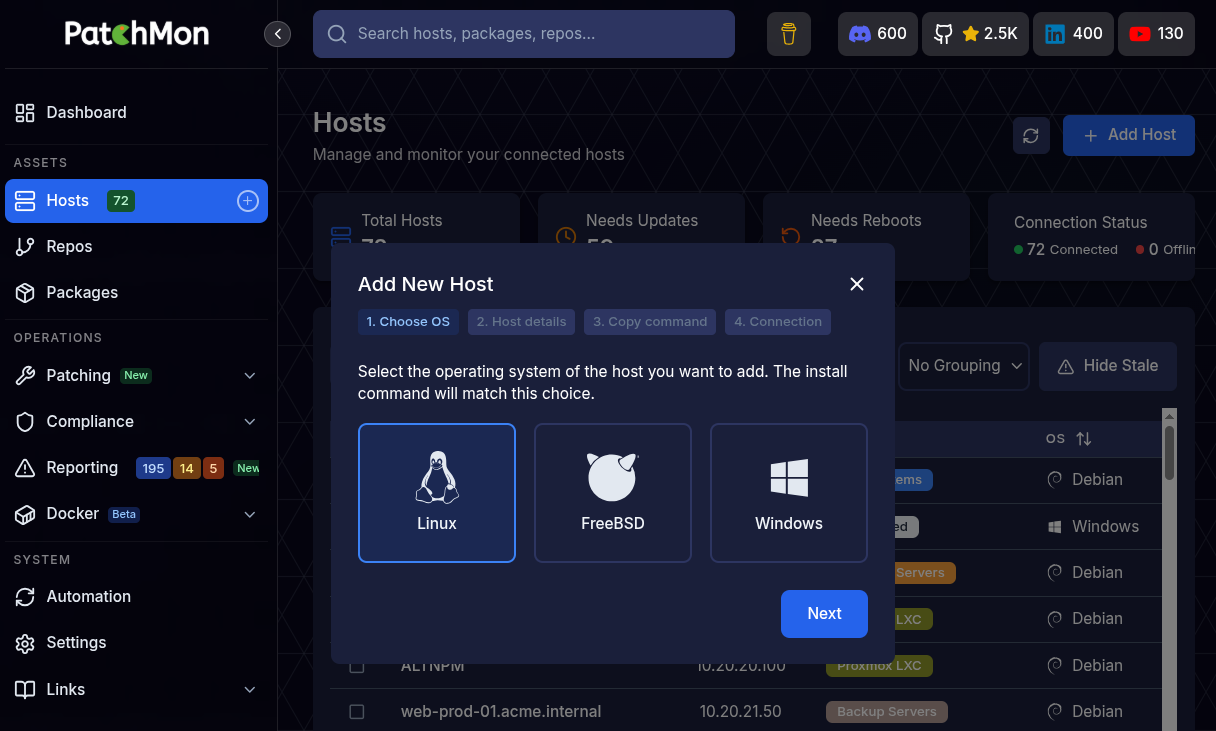
Linux
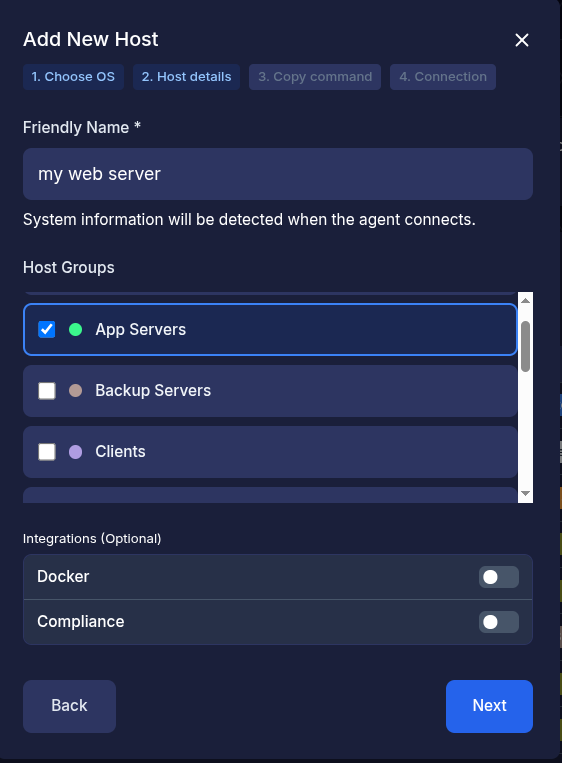
- Press Next
- Enter in the friendly name of the host
- Optionally select the host groups you want to associate this host with. Host groups can be added in Settings -> Host groups
- Optionally toggle integrations such as Docker or Compliance
- Docker integration - Allows docker inventory (stacks, containers, images, networks, volumes etc) to propagate through to PatchMon for visualisation
- Compliance integration - Allows for OpenSCAP and Docker bench scans based agains CIS Benchmarking to take place. Our advice is to leave this disabled until after installation so that you can monitor the status of its installation etc, though once you've done it a few times there is no harm in enabling it later through the hosts individual settings.

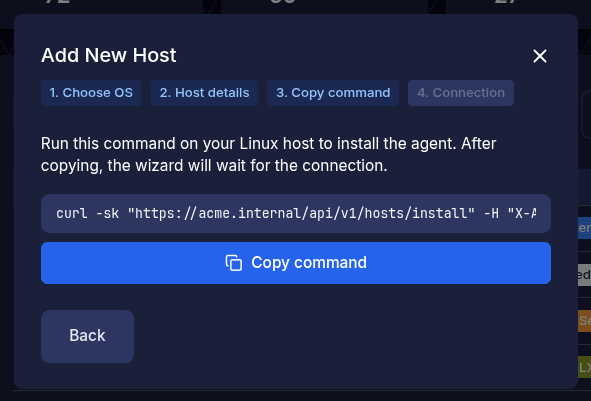
- Press Next and you will be presented with a curl command to run on your server or Linux host to manage.
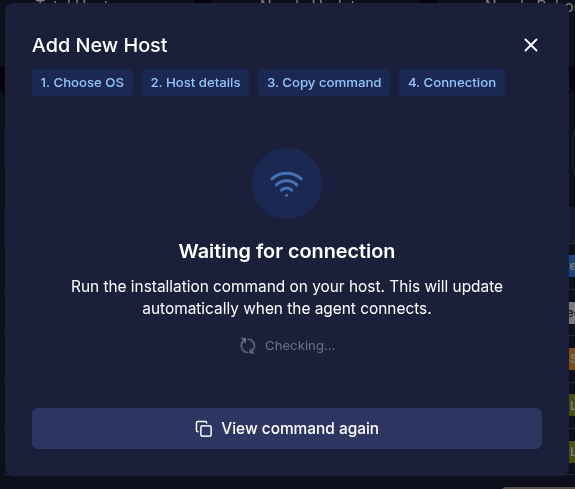
Once the "Copy" button is pressed then PatchMon will expect that you paste this in right away and will present a waiting modal like so :
-

- Now on the host you are to paste this in and you'll see PatchMon installing the agent. Please run this as root
- Once pasted in and the command runs, it will finish with this:
SUCCESS: PatchMon Agent service started successfully
INFO: WebSocket connection established
SUCCESS: PatchMon Agent installation completed successfully!

Installation Summary:
   • Configuration directory: /etc/patchmon
   • Agent binary installed: /usr/local/bin/patchmon-agent
   • Architecture: amd64
   • Dependencies installed: curl
   • Systemd service configured and running
   • API credentials configured and tested
   • WebSocket connection established
   • Logs directory: /etc/patchmon/logs

Management Commands:
   • Test connection: /usr/local/bin/patchmon-agent ping
   • Manual report: /usr/local/bin/patchmon-agent report
   • Check status: /usr/local/bin/patchmon-agent diagnostics
   • Service status: systemctl status patchmon-agent
   • Service logs: journalctl -u patchmon-agent -f
   • Restart service: systemctl restart patchmon-agent

SUCCESS: Your system is now being monitored by PatchMon!
PatchMon will then at this point redirect your page in the browser to the hosts detail view after receiving the initial report.
Note: The first report can sometimes take about 30 seconds, it runs all the package updates from the repositories and collects the data but it shouldn't ever take more than 60 seconds - so do investigate if it does. Another note is that once the agent is installed and the "waiting for report" screen shows, you can come out of that screen and navigate around PatchMon and the report will be fed in its own time.
This is what you should see on the host detail page after the report:
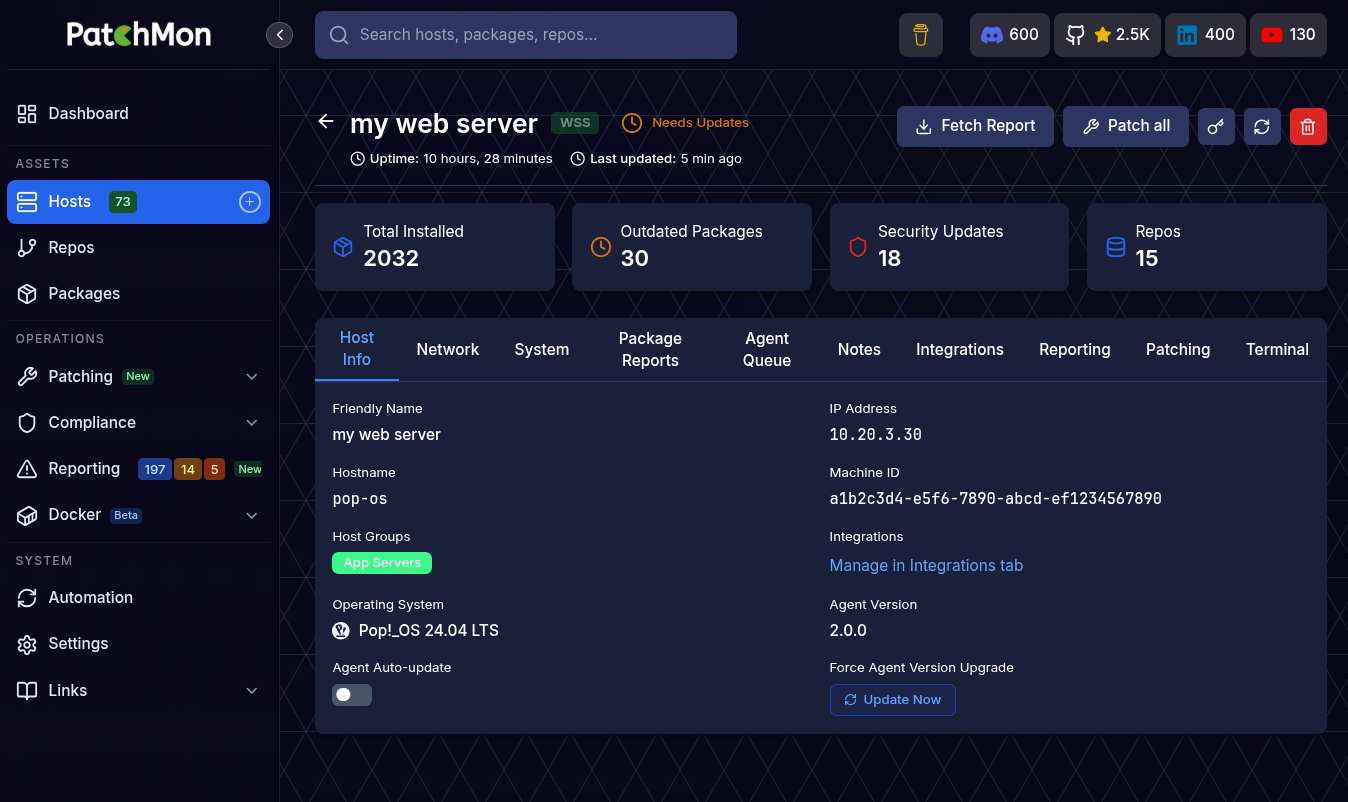
First time setup admin page
First time admin setup
Upon first time setup you will see this page:
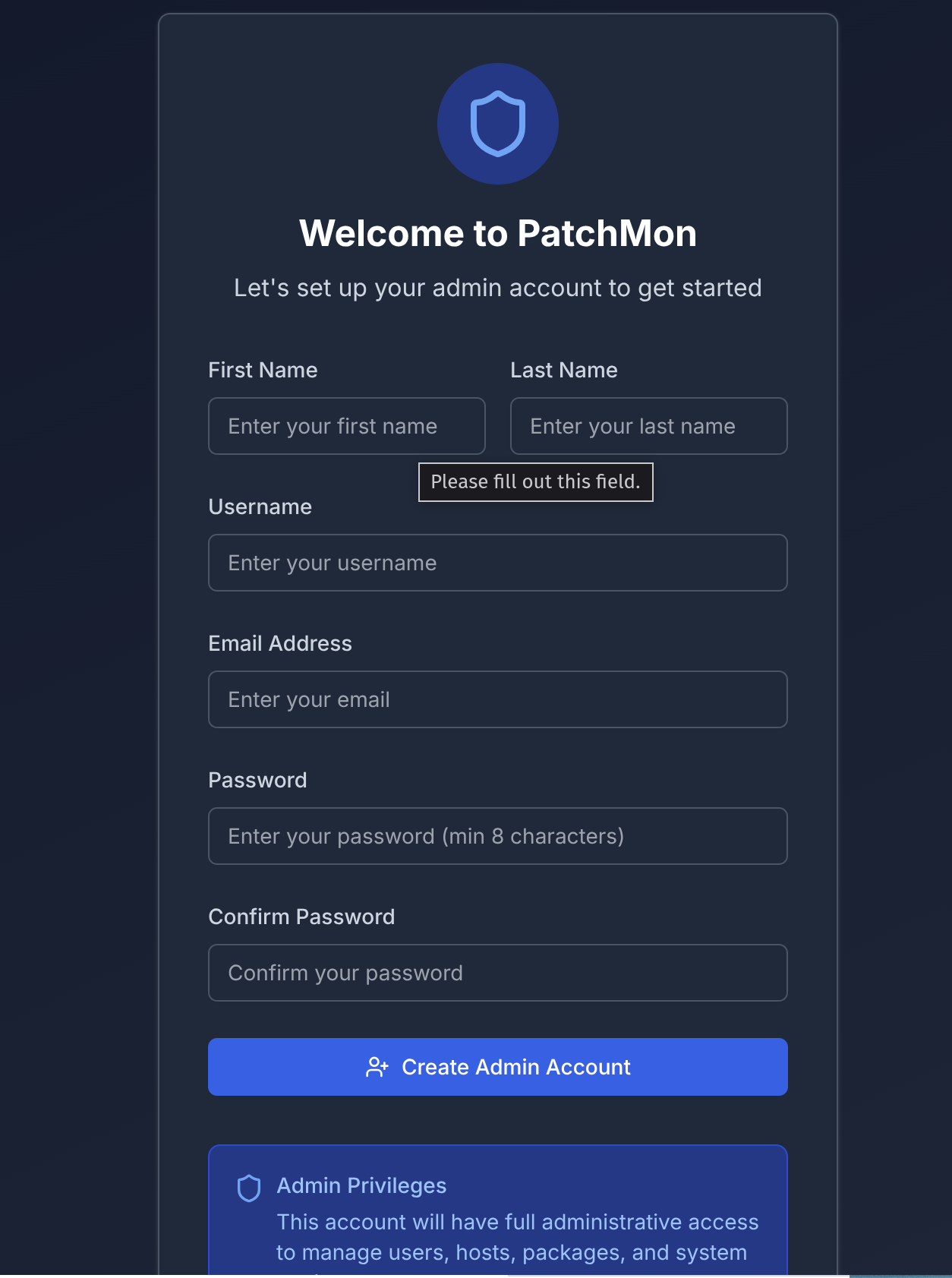
Enter the details and your password (min 8 characters).
Try not using the username "admin" as it's a common one, but something unique to you.
After pressing Create account you will be redirected to the dashboard:
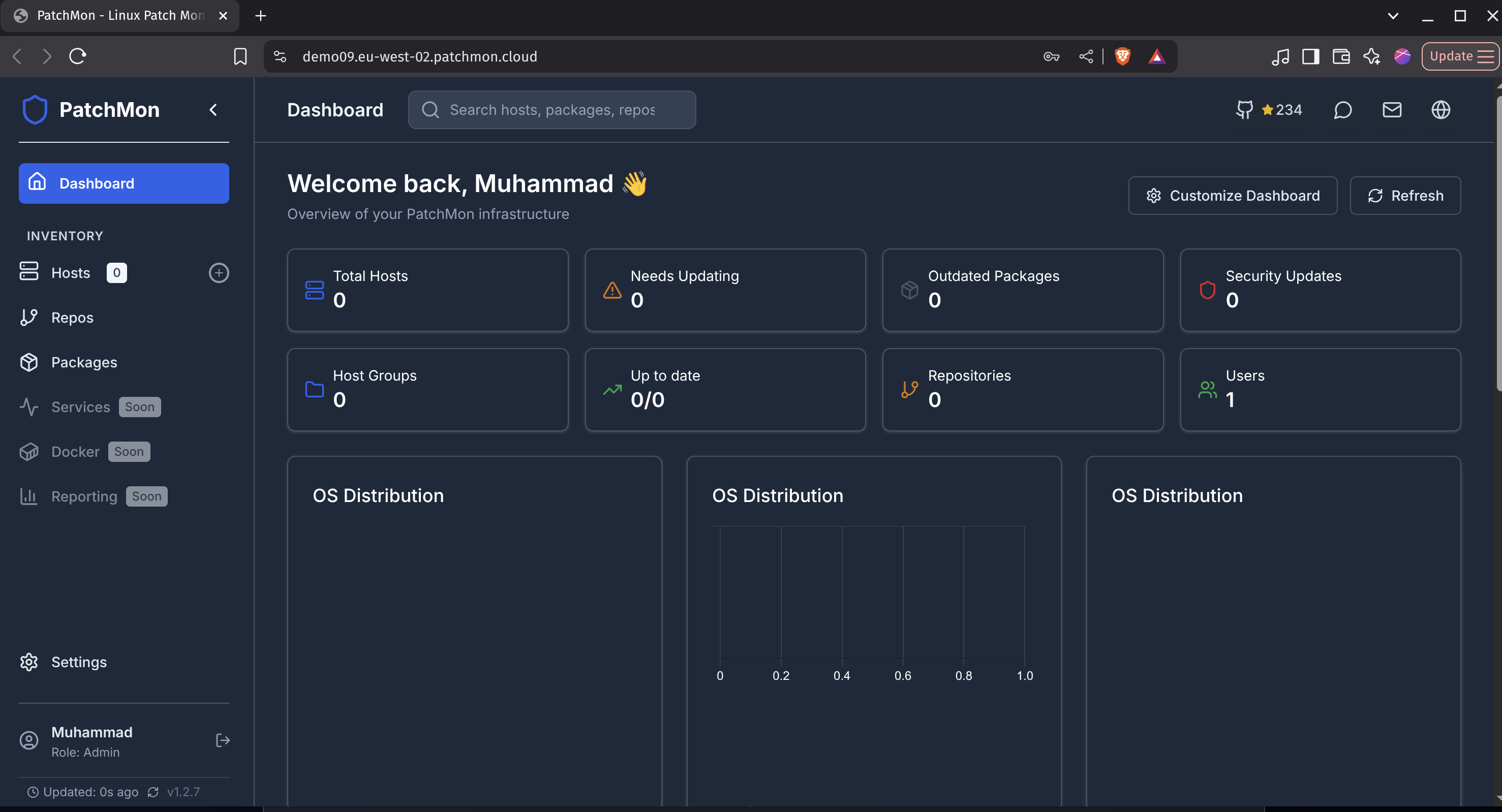
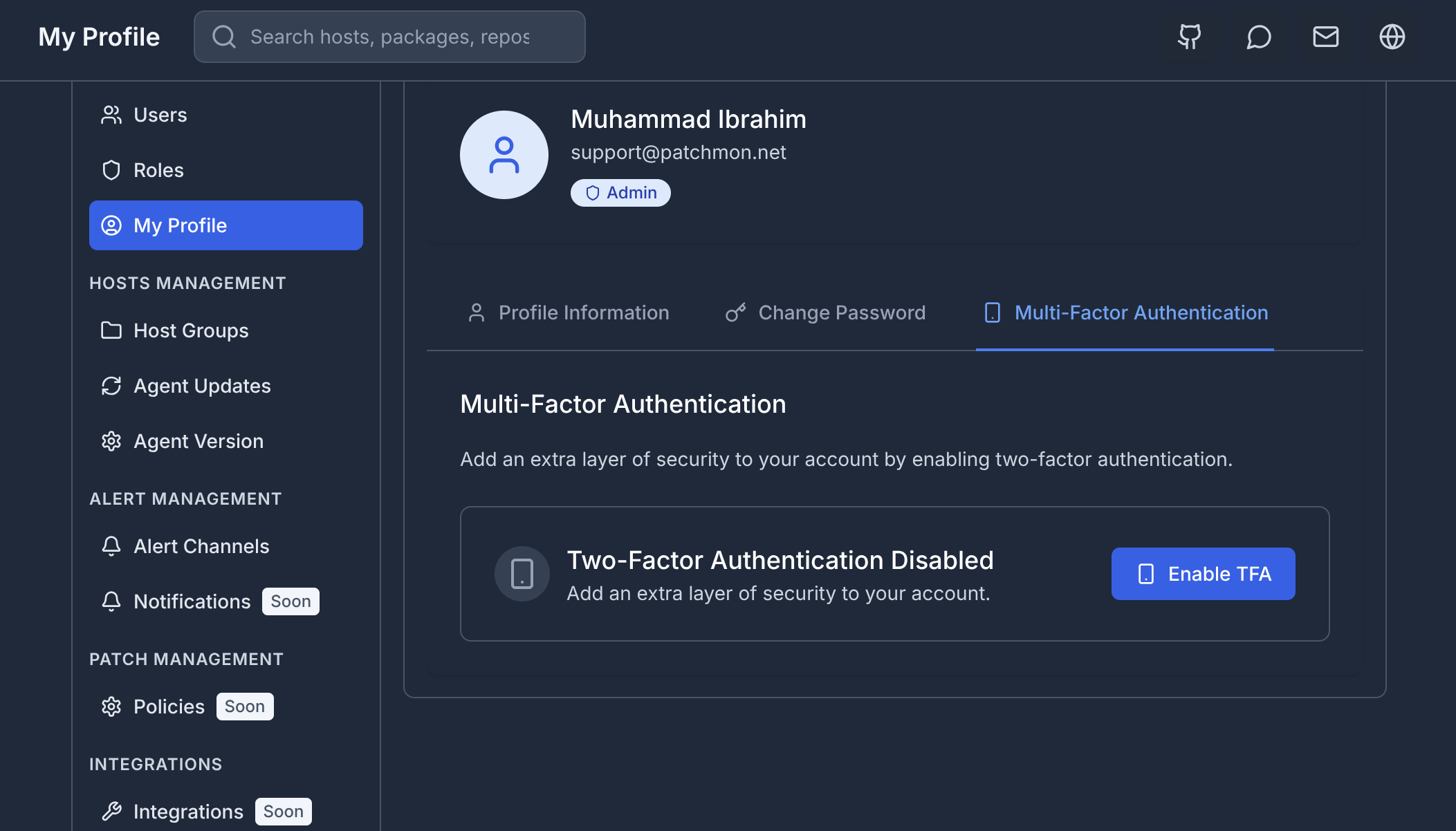
First thing is please setup MFA but going to your profile on the bottom left, you will be greeted with the Profile modification page, please press the Multi-Factor authentication tab and set that up:
If you get errors upon trying to login or create the admin account fort he first time, then ensure you have correctly setup the CORS url setting in your .env file located (/opt/<your instance>/backend/.env) or the docker environment file.
Installing PatchMon Server on K8S with Helm
PatchMon Helm Chart Documentation
Helm chart for deploying PatchMon on Kubernetes.
- Chart repository: github.com/RuTHlessBEat200/PatchMon-helm
- Application repository: github.com/PatchMon/PatchMon
Overview
PatchMon v2.0.0 runs as a containerised application made up of four services:
- Database -- PostgreSQL 18 (StatefulSet with persistent storage)
- Redis -- Redis 8 (used for BullMQ job queues and caching, StatefulSet with persistent storage)
- Server -- Single Go binary serving both the backend API and the React frontend static files (StatefulSet with optional HPA)
- Guacd -- Apache Guacamole proxy daemon for remote desktop / SSH terminal access (Deployment)
Note: In v2.0.0 the separate backend and frontend containers have been merged into a single
serverbinary. If you are upgrading from v1.x, update your values files accordingly —backend.*andfrontend.*keys no longer exist.
The chart deploys all four components into a single namespace and wires them together automatically using init containers, internal ClusterIP services, and a shared ConfigMap.
Container Images
| Component | Image | Default Tag |
|---|---|---|
| Server | ghcr.io/patchmon/patchmon-server | 2.0.0 |
| Database | docker.io/postgres | 18-alpine |
| Redis | docker.io/redis | 8-alpine |
| Guacd | docker.io/guacamole/guacd | latest |
Available Tags (Server)
| Tag | Description |
|---|---|
latest |
Latest stable release |
x.y.z |
Exact version pin (e.g. 2.0.0) |
x.y |
Latest patch in a minor series (e.g. 2.0) |
x |
Latest minor and patch in a major series (e.g. 2) |
edge |
Latest development build from the main branch -- may be unstable, for testing only |
Prerequisites
- Kubernetes 1.19+
- Helm 3.0+
- A PersistentVolume provisioner in the cluster (for database and Redis storage)
- (Optional) An Ingress controller (e.g. NGINX Ingress) for external access
- (Optional) cert-manager for automatic TLS certificate management
- (Optional) Metrics Server for HPA functionality
Quick Start
The quickest way to get PatchMon running is to use the provided
values-quick-start.yaml file.
It contains all required secrets inline and sensible defaults so you can install
with a single command.
Warning:
values-quick-start.yamlships with placeholder secrets and is intended for evaluation and testing only. Never use it in production without replacing all secret values.
1. Install the chart
wget https://github.com/RuTHlessBEat200/PatchMon-helm/blob/main/values-quick-start.yaml
helm install patchmon oci://ghcr.io/ruthlessbeat200/charts/patchmon \
  --namespace patchmon \
  --create-namespace \
  --values values-quick-start.yaml
2. Wait for pods to become ready
kubectl get pods -n patchmon -w
3. Access PatchMon
If ingress is enabled, open the host you configured (e.g. https://patchmon-dev.example.com).
Without ingress, use port-forwarding:
kubectl port-forward -n patchmon svc/patchmon-dev-server 3000:3000
Production Deployment
For production use, refer to the provided
values-prod.yaml file as a starting point.
It demonstrates how to:
- Use an external secret (e.g. managed by KSOPS, Sealed Secrets, or External Secrets Operator) instead of inline passwords
- Configure HTTPS with cert-manager
- Set the correct server protocol, host, and port for agent communication
1. Create your secrets
The chart does not auto-generate secrets. You must supply them yourself.
Required secrets:
| Key | Description |
|---|---|
postgres-password |
PostgreSQL password |
redis-password |
Redis password |
jwt-secret |
JWT signing secret for the server |
ai-encryption-key |
Encryption key for AI provider credentials |
oidc-client-secret |
OIDC client secret (only if OIDC is enabled) |
You can either:
- Set passwords directly in your values file (
database.auth.password,redis.auth.password,server.jwtSecret,server.aiEncryptionKey), or - Create a Kubernetes Secret separately and reference it with
existingSecret/existingSecretPasswordKeyfields.
Example -- creating a secret manually:
kubectl create namespace patchmon

kubectl create secret generic patchmon-secrets \
  --namespace patchmon \
  --from-literal=postgres-password="$(openssl rand -hex 32)" \
  --from-literal=redis-password="$(openssl rand -hex 32)" \
  --from-literal=jwt-secret="$(openssl rand -hex 64)" \
  --from-literal=ai-encryption-key="$(openssl rand -hex 32)"
Secret management tools for production:
- KSOPS -- encrypt secrets in Git using Mozilla SOPS
- Sealed Secrets -- encrypt secrets that only the cluster can decrypt
- External Secrets Operator -- sync secrets from external stores (Vault, AWS Secrets Manager, etc.)
- Vault -- enterprise-grade secret management
2. Create your values file
Start from values-prod.yaml and adjust to your environment:
global:
  storageClass: "your-storage-class"

fullnameOverride: "patchmon-prod"

server:
  env:
    serverProtocol: https
    serverHost: patchmon.example.com
    serverPort: "443"
    corsOrigin: https://patchmon.example.com
  existingSecret: "patchmon-secrets"
  existingSecretJwtKey: "jwt-secret"
  existingSecretAiEncryptionKey: "ai-encryption-key"

database:
  auth:
    existingSecret: patchmon-secrets
    existingSecretPasswordKey: postgres-password

redis:
  auth:
    existingSecret: patchmon-secrets
    existingSecretPasswordKey: redis-password

secret:
  create: false   # Disable chart-managed secret since we use an external one

ingress:
  enabled: true
  className: nginx
  annotations:
    cert-manager.io/cluster-issuer: letsencrypt-prod
    nginx.ingress.kubernetes.io/proxy-body-size: "0"
    nginx.ingress.kubernetes.io/proxy-read-timeout: "3600"
    nginx.ingress.kubernetes.io/proxy-send-timeout: "3600"
    nginx.ingress.kubernetes.io/proxy-connect-timeout: "60"
    nginx.ingress.kubernetes.io/proxy-http-version: "1.1"
    nginx.ingress.kubernetes.io/client-body-buffer-size: "4m"
    nginx.ingress.kubernetes.io/websocket-services: "server"
  hosts:
    - host: patchmon.example.com
      paths:
        - path: /
          pathType: Prefix
          service:
            name: server
            port: 3000
  tls:
    - secretName: patchmon-tls
      hosts:
        - patchmon.example.com
3. Install
helm install patchmon oci://ghcr.io/ruthlessbeat200/charts/patchmon \
  --namespace patchmon \
  --create-namespace \
  --values values-prod.yaml
Configuration Reference
Global Settings
| Parameter | Description | Default |
|---|---|---|
global.imageRegistry |
Override the image registry for all components | "" |
global.imageTag |
Override the image tag for the server (takes priority over server.image.tag if set) |
"" |
global.imagePullSecrets |
Image pull secrets applied to all pods | [] |
global.storageClass |
Default storage class for all PVCs | "" |
nameOverride |
Override the chart name used in resource names | "" |
fullnameOverride |
Override the full resource name prefix | "patchmon-prod" |
commonLabels |
Labels added to all resources | {} |
commonAnnotations |
Annotations added to all resources | {} |
Database (PostgreSQL)
| Parameter | Description | Default |
|---|---|---|
database.enabled |
Deploy the PostgreSQL StatefulSet | true |
database.image.registry |
Image registry | docker.io |
database.image.repository |
Image repository | postgres |
database.image.tag |
Image tag | 18-alpine |
database.image.pullPolicy |
Image pull policy | IfNotPresent |
database.host |
External database host (overrides built-in service discovery when set) | "" |
database.port |
External database port | "" |
database.auth.database |
Database name | patchmon_db |
database.auth.username |
Database user | patchmon_user |
database.auth.password |
Database password (required if existingSecret is not set) |
"" |
database.auth.existingSecret |
Name of an existing secret containing the password | "" |
database.auth.existingSecretPasswordKey |
Key inside the existing secret | postgres-password |
database.replicaCount |
Number of replicas | 1 |
database.updateStrategy.type |
StatefulSet update strategy | RollingUpdate |
database.persistence.enabled |
Enable persistent storage | true |
database.persistence.storageClass |
Storage class (falls back to global.storageClass) |
"" |
database.persistence.accessModes |
PVC access modes | ["ReadWriteOnce"] |
database.persistence.size |
PVC size | 5Gi |
database.resources.requests.cpu |
CPU request | 100m |
database.resources.requests.memory |
Memory request | 128Mi |
database.resources.limits.cpu |
CPU limit | 1000m |
database.resources.limits.memory |
Memory limit | 1Gi |
database.livenessProbe.enabled |
Enable liveness probe | true |
database.readinessProbe.enabled |
Enable readiness probe | true |
database.service.type |
Service type | ClusterIP |
database.service.port |
Service port | 5432 |
database.podAnnotations |
Pod annotations | {} |
database.podSecurityContext |
Pod-level security context | see values.yaml |
database.securityContext |
Container-level security context | see values.yaml |
database.nodeSelector |
Node selector | {} |
database.tolerations |
Tolerations | [] |
database.affinity |
Affinity rules | {} |
Redis
| Parameter | Description | Default |
|---|---|---|
redis.enabled |
Deploy the Redis StatefulSet | true |
redis.image.registry |
Image registry | docker.io |
redis.image.repository |
Image repository | redis |
redis.image.tag |
Image tag | 8-alpine |
redis.image.pullPolicy |
Image pull policy | IfNotPresent |
redis.auth.password |
Redis password (required if existingSecret is not set) |
"" |
redis.auth.existingSecret |
Name of an existing secret containing the password | "" |
redis.auth.existingSecretPasswordKey |
Key inside the existing secret | redis-password |
redis.replicaCount |
Number of replicas | 1 |
redis.updateStrategy.type |
StatefulSet update strategy | RollingUpdate |
redis.persistence.enabled |
Enable persistent storage | true |
redis.persistence.storageClass |
Storage class (falls back to global.storageClass) |
"" |
redis.persistence.accessModes |
PVC access modes | ["ReadWriteOnce"] |
redis.persistence.size |
PVC size | 5Gi |
redis.resources.requests.cpu |
CPU request | 50m |
redis.resources.requests.memory |
Memory request | 10Mi |
redis.resources.limits.cpu |
CPU limit | 500m |
redis.resources.limits.memory |
Memory limit | 512Mi |
redis.livenessProbe.enabled |
Enable liveness probe | true |
redis.readinessProbe.enabled |
Enable readiness probe | true |
redis.service.type |
Service type | ClusterIP |
redis.service.port |
Service port | 6379 |
redis.podAnnotations |
Pod annotations | {} |
redis.podSecurityContext |
Pod-level security context | see values.yaml |
redis.securityContext |
Container-level security context | see values.yaml |
redis.nodeSelector |
Node selector | {} |
redis.tolerations |
Tolerations | [] |
redis.affinity |
Affinity rules | {} |
Server
The server component is a single Go binary that serves both the backend API and the React frontend on port 3000. It is deployed as a StatefulSet.
| Parameter | Description | Default |
|---|---|---|
server.enabled |
Deploy the server | true |
server.image.registry |
Image registry | ghcr.io |
server.image.repository |
Image repository | patchmon/patchmon-server |
server.image.tag |
Image tag (overridden by global.imageTag if set) |
2.0.0 |
server.image.pullPolicy |
Image pull policy | IfNotPresent |
server.replicaCount |
Number of replicas | 1 |
server.updateStrategy.type |
StatefulSet update strategy | RollingUpdate |
server.jwtSecret |
JWT signing secret (required if existingSecret is not set) |
"" |
server.aiEncryptionKey |
AI encryption key (required if existingSecret is not set) |
"" |
server.existingSecret |
Name of an existing secret for JWT and AI encryption key | "" |
server.existingSecretJwtKey |
Key for JWT secret inside the existing secret | jwt-secret |
server.existingSecretAiEncryptionKey |
Key for AI encryption key inside the existing secret | ai-encryption-key |
server.resources.requests.cpu |
CPU request | 10m |
server.resources.requests.memory |
Memory request | 256Mi |
server.resources.limits.cpu |
CPU limit | 2000m |
server.resources.limits.memory |
Memory limit | 2Gi |
server.autoscaling.enabled |
Enable HPA | false |
server.autoscaling.minReplicas |
Minimum replicas | 1 |
server.autoscaling.maxReplicas |
Maximum replicas | 10 |
server.autoscaling.targetCPUUtilizationPercentage |
Target CPU utilisation | 80 |
server.autoscaling.targetMemoryUtilizationPercentage |
Target memory utilisation | 80 |
server.service.type |
Service type | ClusterIP |
server.service.port |
Service port | 3000 |
server.service.annotations |
Service annotations | [] |
server.livenessProbe.enabled |
Enable liveness probe (TCP on port 3000) | true |
server.readinessProbe.enabled |
Enable readiness probe (GET /health on port 3000) |
true |
server.initContainers.waitForDatabase.enabled |
Wait for database before starting | true |
server.initContainers.waitForRedis.enabled |
Wait for Redis before starting | true |
server.initContainers.waitForGuacd.enabled |
Wait for guacd before starting | true |
server.extraEnv |
Extra environment variables to inject into the server container | [] |
server.extraVolumeMounts |
Extra volume mounts for the server container | [] |
server.extraVolumes |
Extra volumes to add to the server pod | [] |
server.podAnnotations |
Pod annotations | {} |
server.podSecurityContext |
Pod-level security context | see values.yaml |
server.securityContext |
Container-level security context | see values.yaml |
server.nodeSelector |
Node selector | {} |
server.tolerations |
Tolerations | [] |
server.affinity |
Affinity rules | {} |
server.topologySpreadConstraints |
Topology spread constraints | [] |
Server Environment Variables
| Parameter | Description | Default |
|---|---|---|
server.env.enableLogging |
Enable application logging | true |
server.env.logLevel |
Log level (trace, debug, info, warn, error) |
info |
server.env.logToConsole |
Log to stdout | true |
server.env.serverProtocol |
Protocol used by agents to reach the server (http or https) |
http |
server.env.serverHost |
Hostname used by agents to reach the server | patchmon.example.com |
server.env.serverPort |
Port used by agents (80 or 443) |
80 |
server.env.corsOrigin |
CORS allowed origin (should match the URL users access in a browser) | http://patchmon.example.com |
server.env.dbConnectionLimit |
Database connection pool limit | 30 |
server.env.dbPoolTimeout |
Pool timeout in seconds | 20 |
server.env.dbConnectTimeout |
Connection timeout in seconds | 10 |
server.env.dbIdleTimeout |
Idle connection timeout in seconds | 300 |
server.env.dbMaxLifetime |
Max connection lifetime in seconds | 1800 |
server.env.rateLimitWindowMs |
General rate limit window (ms) | 900000 |
server.env.rateLimitMax |
General rate limit max requests | 5000 |
server.env.authRateLimitWindowMs |
Auth rate limit window (ms) | 600000 |
server.env.authRateLimitMax |
Auth rate limit max requests | 500 |
server.env.agentRateLimitWindowMs |
Agent rate limit window (ms) | 60000 |
server.env.agentRateLimitMax |
Agent rate limit max requests | 1000 |
server.env.redisDb |
Redis database index | 0 |
server.env.trustProxy |
Trust proxy headers -- set to a CIDR range or true when behind a reverse proxy |
10.0.0.0/8,172.16.0.0/12,192.168.0.0/16 |
server.env.enableHsts |
Enable HSTS header | false |
server.env.defaultUserRole |
Default role for new users | user |
server.env.autoCreateRolePermissions |
Auto-create role permissions | false |
OIDC / SSO Configuration
| Parameter | Description | Default |
|---|---|---|
server.oidc.enabled |
Enable OIDC authentication | false |
server.oidc.issuerUrl |
OIDC issuer URL | "" |
server.oidc.clientId |
OIDC client ID | "" |
server.oidc.clientSecret |
OIDC client secret (required if existingSecret not set) |
"" |
server.oidc.existingSecret |
Existing secret containing the OIDC client secret | "" |
server.oidc.existingSecretClientSecretKey |
Key inside the existing secret | oidc-client-secret |
server.oidc.scopes |
OIDC scopes | openid profile email |
server.oidc.buttonText |
Login button text | Login with SSO |
server.oidc.autoCreateUsers |
Auto-create users on first OIDC login | true |
server.oidc.defaultRole |
Default role for OIDC-created users | user |
server.oidc.syncRoles |
Sync roles from OIDC group claims | true |
server.oidc.disableLocalAuth |
Disable local username/password authentication | false |
server.oidc.sessionTtl |
OIDC session TTL in seconds | 86400 |
server.oidc.groups.superadmin |
OIDC group mapped to the superadmin role | "" |
server.oidc.groups.admin |
OIDC group mapped to the admin role | "" |
server.oidc.groups.hostManager |
OIDC group mapped to the hostManager role | "" |
server.oidc.groups.user |
OIDC group mapped to the user role | "" |
server.oidc.groups.readonly |
OIDC group mapped to the readonly role | "" |
Guacd
Apache Guacamole proxy daemon used for browser-based SSH and remote desktop sessions.
| Parameter | Description | Default |
|---|---|---|
guacd.enabled |
Deploy guacd | true |
guacd.image.registry |
Image registry | docker.io |
guacd.image.repository |
Image repository | guacamole/guacd |
guacd.image.tag |
Image tag | latest |
guacd.image.pullPolicy |
Image pull policy | IfNotPresent |
guacd.replicaCount |
Number of replicas | 1 |
guacd.updateStrategy.type |
Deployment update strategy | RollingUpdate |
guacd.resources.requests.cpu |
CPU request | 10m |
guacd.resources.requests.memory |
Memory request | 32Mi |
guacd.resources.limits.cpu |
CPU limit | 1000m |
guacd.resources.limits.memory |
Memory limit | 512Mi |
guacd.livenessProbe.enabled |
Enable liveness probe (TCP) | true |
guacd.readinessProbe.enabled |
Enable readiness probe (TCP) | true |
guacd.service.type |
Service type | ClusterIP |
guacd.service.port |
Service port | 4822 |
guacd.podAnnotations |
Pod annotations | {} |
guacd.podSecurityContext |
Pod-level security context | see values.yaml |
guacd.securityContext |
Container-level security context | see values.yaml |
guacd.nodeSelector |
Node selector | {} |
guacd.tolerations |
Tolerations | [] |
guacd.affinity |
Affinity rules | {} |
Ingress
| Parameter | Description | Default |
|---|---|---|
ingress.enabled |
Enable ingress resource | true |
ingress.className |
Ingress class name | "" |
ingress.annotations |
Ingress annotations | see values.yaml |
ingress.hosts |
List of ingress host rules | see values.yaml |
ingress.tls |
TLS configuration | [] (disabled) |
The default ingress annotations enable WebSocket support and tune proxy timeouts for agent connections:
ingress:
  annotations:
    nginx.ingress.kubernetes.io/proxy-body-size: "0"
    nginx.ingress.kubernetes.io/proxy-read-timeout: "3600"
    nginx.ingress.kubernetes.io/proxy-send-timeout: "3600"
    nginx.ingress.kubernetes.io/proxy-connect-timeout: "60"
    nginx.ingress.kubernetes.io/proxy-http-version: "1.1"
    nginx.ingress.kubernetes.io/client-body-buffer-size: "4m"
    nginx.ingress.kubernetes.io/websocket-services: "server"
Other
| Parameter | Description | Default |
|---|---|---|
serviceAccount.create |
Create a ServiceAccount | false |
serviceAccount.annotations |
ServiceAccount annotations | {} |
serviceAccount.name |
ServiceAccount name | "" |
configMap.create |
Create the application ConfigMap | true |
configMap.annotations |
ConfigMap annotations | {} |
secret.create |
Create the chart-managed Secret (disable when using an external secret) | true |
secret.annotations |
Secret annotations | {} |
Persistent Volumes
The chart creates the following PersistentVolumeClaims:
| PVC | Component | Purpose | Default Size |
|---|---|---|---|
postgres-data |
Database | PostgreSQL data directory | 5Gi |
redis-data |
Redis | Redis data directory | 5Gi |
All PVCs respect the global.storageClass setting unless overridden at the component level.
Updating PatchMon
Using global.imageTag
The simplest way to update the server image is to set global.imageTag:
helm upgrade patchmon oci://ghcr.io/ruthlessbeat200/charts/patchmon \
  -n patchmon \
  -f values-prod.yaml \
  --set global.imageTag=2.1.0
When global.imageTag is set it overrides server.image.tag.
Pinning the server tag individually
server:
  image:
    tag: "2.0.0"
Upgrading the chart version
# Upgrade with new values
helm upgrade patchmon oci://ghcr.io/ruthlessbeat200/charts/patchmon \
  --namespace patchmon \
  --values values-prod.yaml

# Upgrade and wait for rollout
helm upgrade patchmon oci://ghcr.io/ruthlessbeat200/charts/patchmon \
  --namespace patchmon \
  --values values-prod.yaml \
  --wait --timeout 10m
Check the releases page for version-specific changes and migration notes.
Uninstalling
# Uninstall the release
helm uninstall patchmon -n patchmon

# Clean up PVCs (optional -- this deletes all data)
kubectl delete pvc -n patchmon -l app.kubernetes.io/instance=patchmon
Advanced Configuration
Custom Image Registry
Override the registry for all images (useful for air-gapped environments or private mirrors):
global:
  imageRegistry: "registry.example.com"
This changes every image pull to use the specified registry:
registry.example.com/postgres:18-alpineregistry.example.com/redis:8-alpineregistry.example.com/guacamole/guacd:latestregistry.example.com/patchmon/patchmon-server:2.0.0registry.example.com/busybox:latest(init containers)
Without global.imageRegistry, components use their default registries (docker.io for database/Redis/guacd, ghcr.io for server).
Multi-Tenant Deployment
Deploy multiple isolated instances in separate namespaces using fullnameOverride:
fullnameOverride: "patchmon-tenant-a"

server:
  env:
    serverHost: tenant-a.patchmon.example.com
    corsOrigin: https://tenant-a.patchmon.example.com

ingress:
  hosts:
    - host: tenant-a.patchmon.example.com
      paths:
        - path: /
          pathType: Prefix
          service:
            name: server
            port: 3000
Horizontal Pod Autoscaling
server:
  autoscaling:
    enabled: true
    minReplicas: 2
    maxReplicas: 10
    targetCPUUtilizationPercentage: 70
    targetMemoryUtilizationPercentage: 80
Using an External Database
Disable the built-in database and point the server at an external PostgreSQL instance:
database:
  enabled: false
  host: "my-postgres.example.com"
  port: 5432
  auth:
    database: patchmon_db
    username: patchmon_user
    existingSecret: patchmon-secrets
    existingSecretPasswordKey: postgres-password
Injecting Extra Environment Variables
Use server.extraEnv to pass additional environment variables, for example to trust a custom CA for OIDC:
server:
  extraEnv:
    - name: NODE_EXTRA_CA_CERTS
      value: /etc/ssl/certs/my-ca.crt
  extraVolumeMounts:
    - name: my-ca
      mountPath: /etc/ssl/certs/my-ca.crt
      subPath: ca.crt
      readOnly: true
  extraVolumes:
    - name: my-ca
      configMap:
        name: my-ca-configmap
OIDC / SSO Integration
server:
  oidc:
    enabled: true
    issuerUrl: "https://auth.example.com/realms/master"
    clientId: "patchmon"
    clientSecret: "your-client-secret"
    scopes: "openid profile email groups"
    buttonText: "Login with SSO"
    autoCreateUsers: true
    syncRoles: true
    groups:
      superadmin: "patchmon-admins"
      admin: ""
      hostManager: ""
      user: ""
      readonly: ""
Troubleshooting
Check pod status
kubectl get pods -n patchmon
kubectl describe pod <pod-name> -n patchmon
kubectl logs <pod-name> -n patchmon
Check init container logs
kubectl logs <pod-name> -n patchmon -c wait-for-database
kubectl logs <pod-name> -n patchmon -c wait-for-redis
kubectl logs <pod-name> -n patchmon -c wait-for-guacd
Check service connectivity
# Test database connection
kubectl exec -n patchmon -it statefulset/patchmon-prod-server -- nc -zv patchmon-prod-database 5432

# Test Redis connection
kubectl exec -n patchmon -it statefulset/patchmon-prod-server -- nc -zv patchmon-prod-redis 6379

# Test guacd connection
kubectl exec -n patchmon -it statefulset/patchmon-prod-server -- nc -zv patchmon-prod-guacd 4822

# Check server health
kubectl exec -n patchmon -it statefulset/patchmon-prod-server -- wget -qO- http://localhost:3000/health
Common issues
| Symptom | Likely cause | Fix |
|---|---|---|
Pods stuck in Init state |
Database, Redis, or guacd not yet running | Check StatefulSet/Deployment events: kubectl describe sts -n patchmon |
PVC stuck in Pending |
No matching StorageClass or no available PV | Verify storage class exists: kubectl get sc |
ImagePullBackOff |
Registry credentials missing or incorrect image reference | Check imagePullSecrets and image path |
| Ingress returns 404 / 502 | Ingress controller not installed or misconfigured path rules | Verify controller pods and ingress resource: kubectl describe ingress -n patchmon |
| WebSocket disconnects | Missing WebSocket annotations on ingress | Ensure nginx.ingress.kubernetes.io/websocket-services: "server" and proxy timeout annotations are set |
secret ... not found |
Required secret was not created before install | Create the secret or set secret.create: true with inline passwords |
Development
Lint the chart
helm lint .
Render templates locally
# Render with default values
helm template patchmon . --values values-quick-start.yaml

# Render with production values
helm template patchmon . --values values-prod.yaml

# Debug template rendering
helm template patchmon . --values values-quick-start.yaml --debug
Dry-run installation
helm install patchmon . \
  --namespace patchmon \
  --dry-run --debug \
  --values values-quick-start.yaml
Support
- GitHub Issues: github.com/RuTHlessBEat200/PatchMon-helm/issues
- Application repository: github.com/PatchMon/PatchMon
Nginx example configuration for PatchMon
This nginx configuration is for the type of installation where it's on bare-metal / native installation.
Edits the ports as required
# Example nginx config for PatchMon
# - Frontend served from disk; /bullboard and /api/ proxied to backend
# - HTTP → HTTPS redirect, WebSocket (WSS) support, static asset caching
# Replace: your-domain.com, /opt/your-domain.com/frontend, backend port
# Copy to /etc/nginx/sites-available/ and symlink from sites-enabled, then:
#   sudo nginx -t && sudo systemctl reload nginx

map $http_upgrade $connection_upgrade {
    default upgrade;
    ''      close;
}
upstream patchmon {
    server 127.0.0.1:3001;
}

# Redirect all HTTP to HTTPS (so ws:// is never used; frontend uses wss://)
server {
    listen 80;
    listen [::]:80;
    server_name your-domain.com;

    location /.well-known/acme-challenge/ {
        root /var/www/html;
    }

    location / {
        return 301 https://$host$request_uri;
    }
}

server {
    listen 443 ssl http2;
    listen [::]:443 ssl http2;
    server_name your-domain.com;

    # SSL (Let's Encrypt)
    ssl_certificate /etc/letsencrypt/live/your-domain.com/fullchain.pem;
    ssl_certificate_key /etc/letsencrypt/live/your-domain.com/privkey.pem;
    include /etc/letsencrypt/options-ssl-nginx.conf;
    ssl_dhparam /etc/letsencrypt/ssl-dhparams.pem;

    # Security headers
    add_header Strict-Transport-Security "max-age=31536000; includeSubDomains" always;
    add_header X-Frame-Options DENY always;
    add_header X-Content-Type-Options nosniff always;
    add_header X-XSS-Protection "1; mode=block" always;
    add_header Referrer-Policy "strict-origin-when-cross-origin" always;

    # Gzip
    gzip on;
    gzip_vary on;
    gzip_min_length 1024;
    gzip_proxied any;
    gzip_types text/plain text/css text/xml text/javascript application/javascript application/json application/xml;

    # Bull Board – queue UI and WebSocket (before location /)
    location /bullboard {
        proxy_pass http://localhost:3001;
        proxy_http_version 1.1;
        proxy_set_header Upgrade $http_upgrade;
        proxy_set_header Connection $connection_upgrade;
        proxy_set_header Host $host;
        proxy_set_header X-Real-IP $remote_addr;
        proxy_set_header X-Forwarded-For $proxy_add_x_forwarded_for;
        proxy_set_header X-Forwarded-Proto $scheme;
        proxy_set_header X-Forwarded-Host $host;
        proxy_set_header X-Forwarded-Port 443;
        proxy_set_header Cookie $http_cookie;
        proxy_cache_bypass $http_upgrade;
        proxy_read_timeout 86400s;
        proxy_send_timeout 86400s;
        proxy_connect_timeout 75s;
        proxy_pass_header Set-Cookie;
        proxy_cookie_path / /;
        proxy_set_header X-Original-Forwarded-For $http_x_forwarded_for;
        if ($request_method = 'OPTIONS') {
            return 204;
        }
    }

    # API – REST and WebSockets (SSH terminal, agent WS)
    location /api/ {
        proxy_pass http://localhost:3001;
        proxy_http_version 1.1;
        proxy_set_header Upgrade $http_upgrade;
        proxy_set_header Connection $connection_upgrade;
        proxy_set_header Host $host;
        proxy_set_header X-Real-IP $remote_addr;
        proxy_set_header X-Forwarded-For $proxy_add_x_forwarded_for;
        proxy_set_header X-Forwarded-Proto $scheme;
        proxy_set_header X-Forwarded-Host $host;
        proxy_set_header X-Forwarded-Port 443;
        proxy_cache_bypass $http_upgrade;
        client_max_body_size 10m;
        proxy_read_timeout 86400s;
        proxy_send_timeout 86400s;
        proxy_connect_timeout 75s;
    }

    # Health check
    location /health {
        proxy_pass http://localhost:3001/health;
        proxy_set_header Host $host;
        proxy_set_header X-Real-IP $remote_addr;
        proxy_set_header X-Forwarded-For $proxy_add_x_forwarded_for;
        proxy_set_header X-Forwarded-Proto $scheme;
    }

    # Static assets caching – SPA js/css/images/fonts; exclude Bull Board and API
    location ~* ^/(?!bullboard|api/).*\.(js|css|png|jpg|jpeg|gif|ico|svg|woff|woff2|ttf|eot)$ {
        root /opt/your-domain.com/frontend;
        expires 1y;
        add_header Cache-Control "public, immutable";
    }

    # Custom branding assets (logos, favicons) – from frontend build
    location /assets/ {
        alias /opt/your-domain.com/frontend/assets/;
        expires 1h;
        add_header Cache-Control "public, must-revalidate";
        add_header Access-Control-Allow-Origin *;
    }

    # Frontend SPA
    location / {
        root /opt/your-domain.com/frontend;
        try_files $uri $uri/ /index.html;
        add_header X-Frame-Options DENY always;
        add_header X-Content-Type-Options nosniff always;
        add_header X-XSS-Protection "1; mode=block" always;
    }

    # Optional: security.txt
    # location /security.txt { return 301 https://$host/.well-known/security.txt; }
    # location = /.well-known/security.txt { alias /var/www/html/.well-known/security.txt; }
}
Draft: Uninstallation / removal of the Agent
This is for removing the agent from the client host:
You can get your own uninstallation command by going to :
- Settings